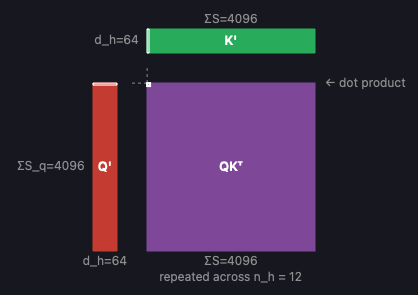
Attention Visualizer is an interactive tool I built for exploring the self-attention mechanism at the heart of transformer models. It renders tensors and operations as isometric 3D blocks, making it easy to see how shapes flow through each stage of attention — from the initial QKV projections through the softmax and final output projection. You can adjust architecture parameters like sequence length, number of heads, and head dimension in real time and watch the diagram update instantly. Clicking any tensor or operation opens a detail panel with a breakdown of FLOPs, memory transfer, arithmetic intensity, and roofline analysis for A100, H100, and B200 GPUs.
If you’re like me and think visually, this is really helpful for understanding the sequence of operations in the major attention variants in use today: MHA, GQA, MQA, and MLA. It’s also helpful for building intuition about how techniques like PagedAttention and FlashAttention speed up inference.
In particular, you can answer questions like:
- What does the causal attention mask look like for a given set of requests? Check out the mask + softmax op, and be sure to decrease sequence lengths so you can see individual elements visualized.
- How does Grouped-Query Attention (GQA) help reduce KV cache size compared to Multi-Head Attention (MHA)? The key/value tensors are visibly smaller because there are fewer heads — you can see this directly by adjusting n_kv.
- How do data parallelism (DP) and tensor parallelism (TP) split up the workload between processors? Increase the sliders to see how the attention heads and requests are divided.
- Why does MLA use different pipelines for decode and prefill? The crossover analysis shows where the memory-bound to compute-bound transition favors one pipeline over the other.
- How does FlashAttention avoid materializing the full attention matrix? Toggle it on, and the detail view shows how the computation is tiled across blocks of Q, K, and V.
- How does PagedAttention organize the KV cache? Toggle it on to see how the cache is broken into fixed-size blocks rather than stored as one contiguous tensor per request.
- What’s the actual compute and memory cost of each operation? Click any op to see a ballpark estimate of the FLOPs, memory transfer, and arithmetic intensity against real GPU specs (A100, H100, B200).