Geometry
Several features take a piece of space as input: where a source acts, where a probe samples or integrates, where a sponge damps, which faces are curved. This page explains the regions they share and how Mallard puts them on a mesh. Every key, with its default, is in the input reference.
Who uses what
| Feature | Geometry | Guide |
|---|---|---|
[[sources]] region |
a filled region, its name, or a region of the mesh (domain, a cell zone) |
Sources |
[[probes]] region |
a region of any dimension, its name, or a region of the mesh: integrals, means, extremes over its cells (filled regions) or over a surface or curve | Probes |
[[probes]] type |
points or a curve; boundary zones and surfaces soon | Probes |
[[sponges]] region |
a filled region, its name, or a region of the mesh, times strength |
Sponge layers |
[[sponges]] strength |
an expression of x, y, z |
Sponge layers |
mallard check (--view DIR) |
every region used and the mesh's own: dimension, measure, cells; a ParaView file of them | Checking regions |
[statistics.phase] probe |
a point | Statistics |
[initialize] type = "analytical" |
expressions of x, y, z, averaged over each cell |
Initialization |
[[initialize.regions]] region |
a region or its name; cut cells averaged exactly for flat surfaces | Initialization |
[[initialize.data]] region |
a region or its name: its signed distance is a table's coordinate | Initialization |
[[mesh.curved]] |
circle, sphere or cylinder of its own keys (to move onto regions: #407) |
Curved boundaries |
Filled regions are volumes (areas in 2D runs). Surfaces and curves, such as boundary zones and the boundaries of regions, are regions too; each feature states the dimension it takes, and a region of another dimension is an error naming both.
Sponges and analytical initial states take expressions; a comparison
such as "hypot(x, y) < 0.2 ? 2.0 : 1.0" draws a sharp region there, which the
initial state averages over each cell. [[initialize.regions]] takes the
region itself, and also layers it over a restart.
Coordinates and units
- Coordinates are those of the mesh as the run sees it, after
[mesh.transform]. - 2D runs use the
z = 0slice of each region: a sphere is a disk, a cylinder along z a disk, a cylinder along x a strip. Points have two components; a third,z, may be given (default 0), and the region is still cut atz = 0. - Lengths take units:
radius = "5 mm",center = ["10 cm", 0, 0]. - Angles are plain numbers in degrees (or quantities,
"0.5 rad"). - Directions (
axis,normal,axes) andscaleare plain numbers; a direction need not be normalized.
Regions
A region is a table: a primitive, a boolean of regions, or the
boundary or interior of a region, each with
optional transforms, nested to any depth; or the name of
one, or of a region of the mesh. Each type has one
dimension, the same wherever it is used: filled (a volume; an area in 2D), a
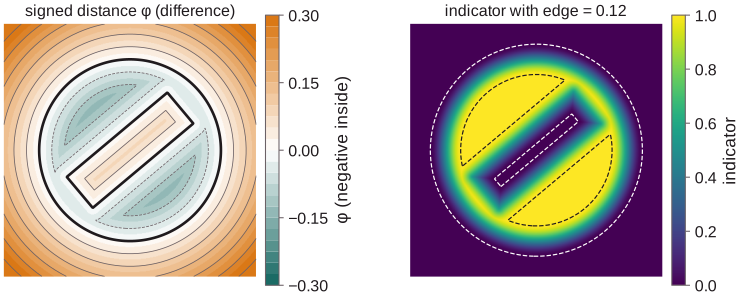
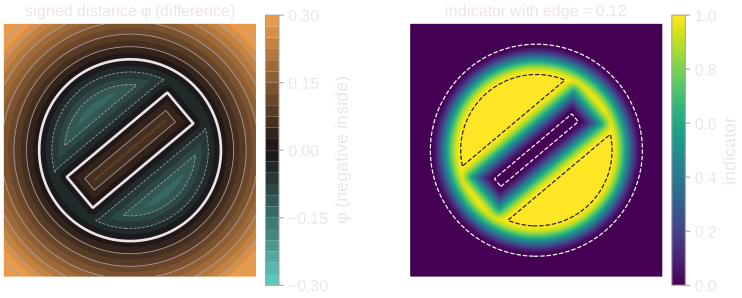
surface, a curve. A filled region of primitives has a signed distance φ,
negative inside, that never exceeds the distance to its surface. Mallard uses it
to skip cells far from the surface and to give smooth edges
their width.
Named regions
[regions]
burner = {type = "cylinder", center = [0, 0, 0], axis = [0, 0, 1], radius = 0.02, length = 0.05, edge = 0.004}

[[sources]]
name = "heat release"
total = true
rhoE = "5 kW"
region = "burner"

[[probes]]
name = "burner"
variables = ["RHO", "T"]
region = "burner"
reductions = ["integral", "mean", "max"]
[regions] defines regions once, by name; any region key, and any part of a
union, intersection or difference, takes the name instead of a table. The
source and the probe above act on the same cells with the same fractions: the
probe's integral_RHO is the mass the source heats. Mallard reads each named
region, and computes its fractions on the mesh, once.
[regions]
duct = {type = "cylinder", center = [0, 0, 0], axis = [1, 0, 0], radius = 0.05, length = 0.4}
plug = {type = "box", center = [0.15, 0, 0], size = [0.1, 0.2, 0.2]}
fluid = {type = "difference", regions = ["duct", "plug"]}
Pitfalls: a name that is not defined is an error that lists the defined ones
and the regions of the mesh;
regions that name each other in a loop are an error naming the loop; a named
region no feature uses is an unused key (an error, like any other); and edge
belongs to the outermost region, so a named region with edge cannot be a part
of a boolean.
Primitives
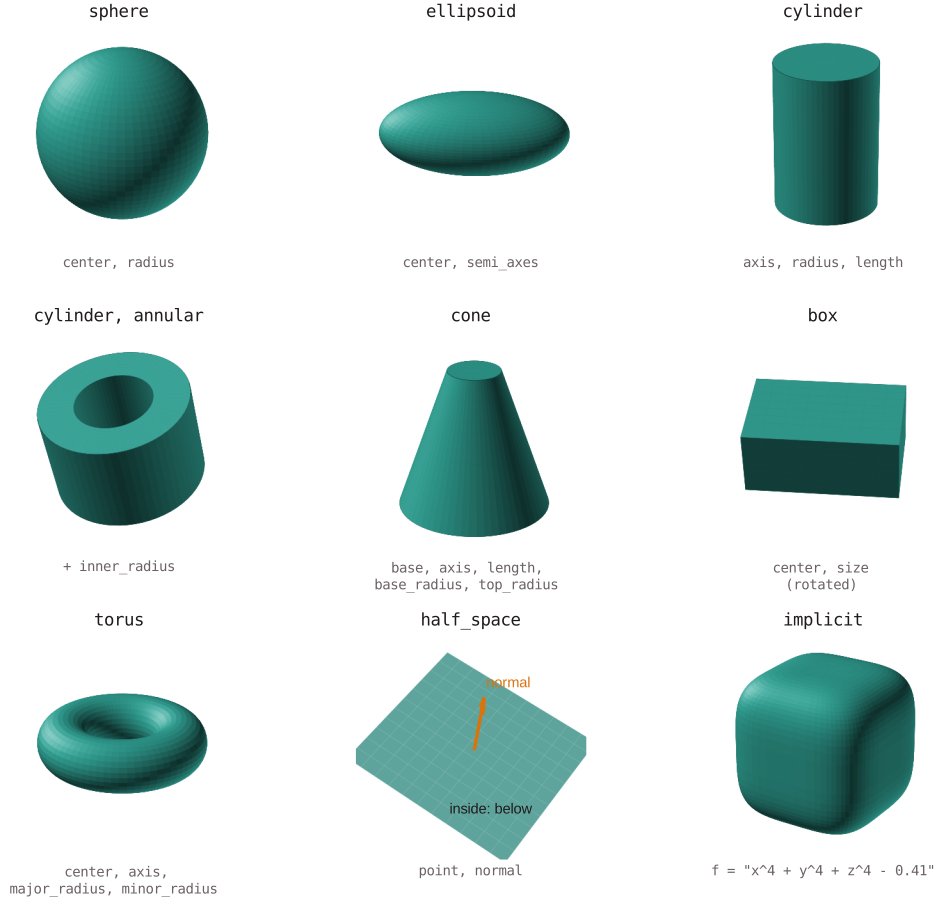
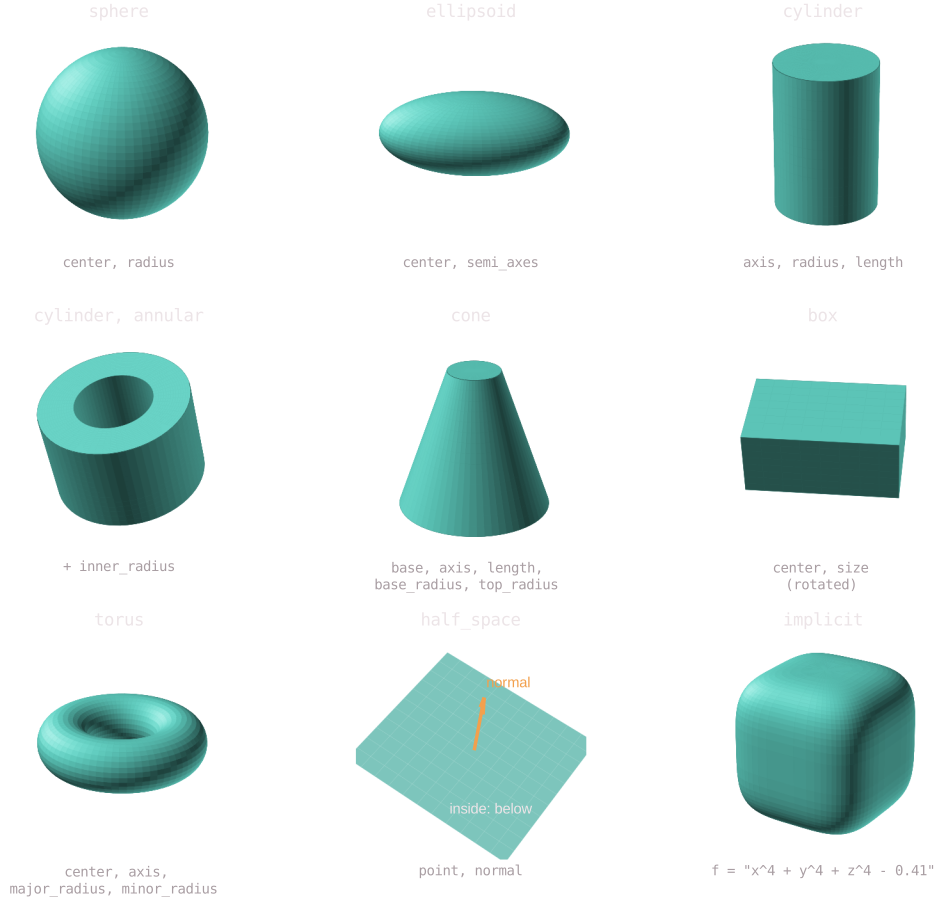
type |
Example |
|---|---|
sphere (2D: also disk) |
{type = "sphere", center = [0, 0, 0], radius = 1} |
ellipsoid |
{type = "ellipsoid", center = [0, 0, 0], semi_axes = [1, 0.5, 0.4]} |
cylinder |
{type = "cylinder", center = [0, 0, 0], axis = [0, 0, 1], radius = 0.5, length = 2} (no length: infinite) |
cylinder, annular |
the same with inner_radius = 0.3: a pipe wall |
annulus (2D) |
{type = "annulus", center = [0, 0], radius = 1, inner_radius = 0.6}: a ring |
cone (frustum) |
{type = "cone", base = [0, 0, 0], axis = [0, 0, 1], length = 1.5, base_radius = 0.8, top_radius = 0.3} |
box (3D) |
{type = "box", center = [0, 0, 0], size = [2, 1, 0.5]} |
rectangle (2D) |
{type = "rectangle", center = [0, 0], size = [2, 1]} |
torus |
{type = "torus", center = [0, 0, 0], axis = [0, 0, 1], major_radius = 1, minor_radius = 0.25} |
half_space |
{type = "half_space", point = [1, 0, 0], normal = [1, 0, 0]}: the side x < 1 |
polygon (2D) |
{type = "polygon", vertices = [[0, 0], [1, 0], [0.5, 1]]} |
implicit |
{type = "implicit", f = "x^4 + y^4 + z^4 - 0.41"}: where f < 0 |
Each type has one dimension, the same in every run: circle and ellipse
are curves; disk, annulus, rectangle and polygon are flat (areas in 2D,
surfaces in 3D); box is a solid, so 3D only. Sources need filled regions, so
3D runs use sphere, ellipsoid, box and cylinder (hollow with
inner_radius), and 2D runs rectangle for a rectangle; in 2D the z = 0
slice of an ellipsoid is the area inside an ellipse. Older inputs with the
former names (circle and ellipse for the filled regions, box in 2D,
disk, annulus and rectangle in 3D) are rewritten by
mallard input upgrade.
Curves and flat surfaces of 3D runs lie in the plane through center normal
to normal; reference (default: the axis of x, y, z least aligned with
normal) gives the plane's first axis, along which a rectangle's first size
and an ellipse's first semi-axis lie:
type |
Example | Dimension |
|---|---|---|
circle |
2D: {type = "circle", center = [0, 0], radius = 1}; 3D: {type = "circle", center = [0, 0, 0], normal = [0, 0, 1], radius = 1} |
curve |
ellipse |
2D: {type = "ellipse", center = [0, 0], semi_axes = [1, 0.5]}; 3D: with normal |
curve |
disk, annulus (3D) |
{type = "disk", center = [0, 0, 0], normal = [1, 0, 0], radius = 0.5}; annulus with inner_radius |
surface |
rectangle (3D) |
{type = "rectangle", center = [0, 0, 0], normal = [0, 0, 1], size = [2, 1], reference = [1, 1, 0]} |
surface |
polygon (3D) |
{type = "polygon", vertices = [[0, 0, 0], [1, 0, 0], [0, 1, 1]]}: its normal by the right-hand rule |
surface |
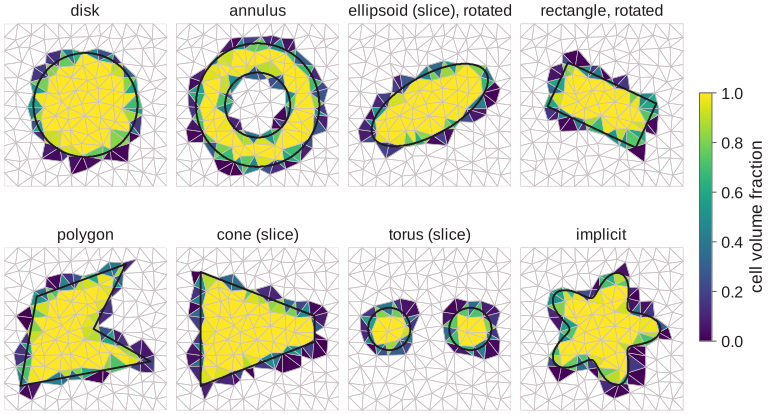
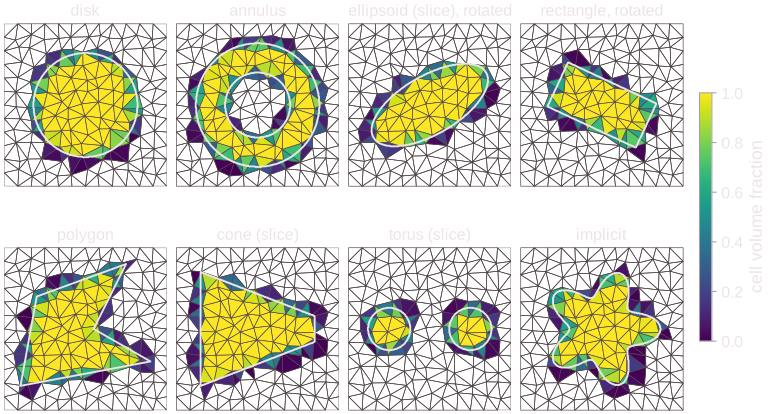
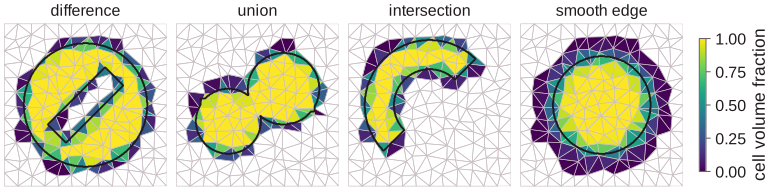
In 2D, each region is the z = 0 slice; Mallard computes the cell volume
fractions below on a coarse triangle mesh, with the exact outline drawn over them:
Regions of the mesh
# Total mass, and the temperature away from the heater
[[probes]]
name = "total"
variables = ["RHO"]
region = "domain"

[[probes]]
name = "away"
variables = ["T"]
region = {type = "difference", regions = ["domain", {type = "sphere", center = [0, 0, 0], radius = 0.05}]}
Every mesh brings regions of its own, by name, without a [regions] entry:
domain: every cell, the filled region of the whole domain;- each boundary zone (
inlet,wall,left, ...): its faces, a surface (a curve in 2D) facing out of the domain; - each cell zone of a mesh file: its cells, a filled region. Cell zones are
Gmsh physical groups of cells (physical surfaces in 2D, physical volumes in
3D), Fluent cell zones, CGNS families of element sections and OpenFOAM
cellZones. Generated meshes have none.
They work wherever a region does: as a region, as a part of a boolean and as
the of of boundary and interior. Their cells
are entirely inside or outside (fractions 0 or 1), so a boolean of one with
primitives keeps the primitives' exact fractions where it keeps them:
domain minus a sphere is exactly one minus the sphere's fractions.
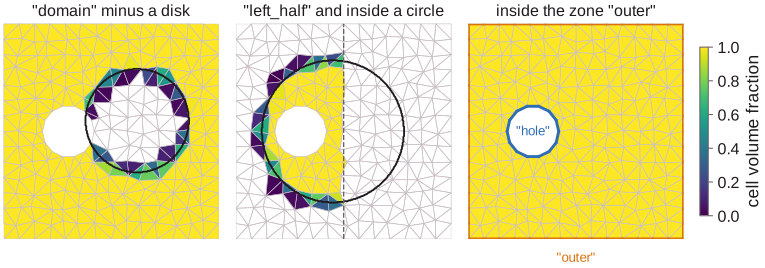
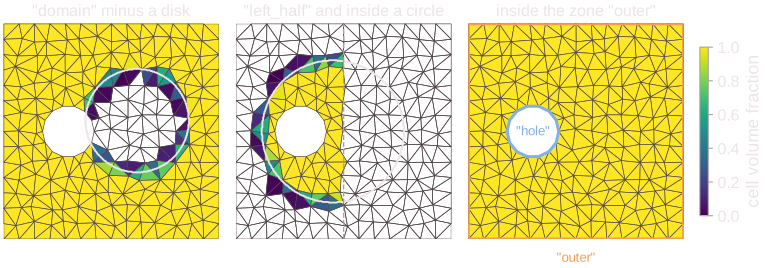
On a square mesh with a hole (boundary zones outer and hole, cell zones
left_half and right_half), the domain minus a disk, the cell zone
left_half inside a circle, and the cells inside the zone outer:
Pitfalls:
- A name in
[regions]that is also a boundary zone, a cell zone ordomainis an error naming both, and so is a mesh whose cell zone has the name of a boundary zone ordomain: rename one of them in the mesh file. - Regions of the mesh do not move: transforms of a boolean that holds one, and
edge, are errors. - They need no use: unlike named regions, an unused one is not an unused key.
Booleans
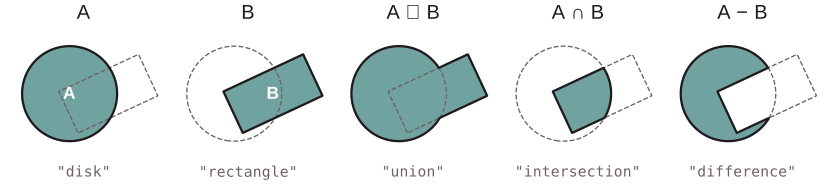
region.type = "difference"
region.a = {type = "disk", center = [0.42, 0.5], radius = 0.27}
region.b = {type = "rectangle", center = [0.64, 0.5], size = [0.5, 0.26], rotate = 25, pivot = [0.64, 0.5]}
union and intersection take regions = [...]; difference takes a and
b, or regions (the first minus the others). Booleans nest; a region
whose evaluation needs a stack deeper than 16 is an error.
Boundaries and interiors
# A sphere, as the region its surface encloses
region = {type = "interior", of = {type = "sphere", center = [0, 0, 0], radius = 1, filled = false}}
# The fluid enclosed by the boundary zones "outer" and "inlet" of a mesh
region = {type = "interior", of = {type = "union", regions = ["outer", "inlet"]}}
{type = "boundary", of = ...} is the boundary of a region, one dimension
lower; {type = "interior", of = ...} the filled region a closed surface (a
closed curve in 2D) encloses, one dimension higher. They are inverses: the
interior of a region's boundary is the region. filled = false on a filled
region or a flat surface is its boundary: {type = "sphere", ..., filled = false}
is the sphere's surface, and in 2D the same table, or a disk with
filled = false, is the circle, {type = "circle", ...}.
of |
boundary |
interior |
|---|---|---|
| a filled region | its closed surface (2D: curve), facing out | error: already filled |
| a closed surface (2D: closed curve) | error: it has none | the filled region inside |
a flat surface (3D: disk, rectangle, ...) |
its edge curve | error: not closed |
a closed curve in 3D (circle, the edge of a disk) |
error: it has none | error: interior takes a surface |
| boundary zones | their edges (2D: end points) if open | the cells inside if closed |
Boundaries of filled booleans are boundaries too: the boundary of domain
minus a sphere is the domain's boundary zones and the sphere's surface, facing
into the sphere. filled = false on a curve is an error that points to
{type = "boundary", of = ...}, which takes regions by name. The interior of
boundary zones is found by winding numbers: each connected part of the mesh
is inside or outside them as a whole, so the interior of the zones around a
domain is the domain, and that of a body's wall holds no cell.
Clipping across dimensions
# The part of the wall zone inside a box
region = {type = "intersection", regions = ["wall", {type = "box", center = [0.5, 0, 0], size = [0.2, 1, 1]}]}
# A plane's section of a duct, outside a centerbody
region = {type = "difference", regions = [{type = "half_space", point = [0.3, 0, 0], normal = [1, 0, 0], filled = false}, "centerbody"]}
intersection and difference of one surface or curve with filled regions
clip it and keep its dimension: an intersection keeps the part inside every
filled region, a difference (the surface or curve first) the part outside
the others. Clipping keeps the surface's orientation; the boundary of a clipped
surface is where the clipping regions cut it. Two surfaces or curves combine
only by union, and a difference that subtracts a surface from a filled
region is an error (it would remove nothing).
Orientation
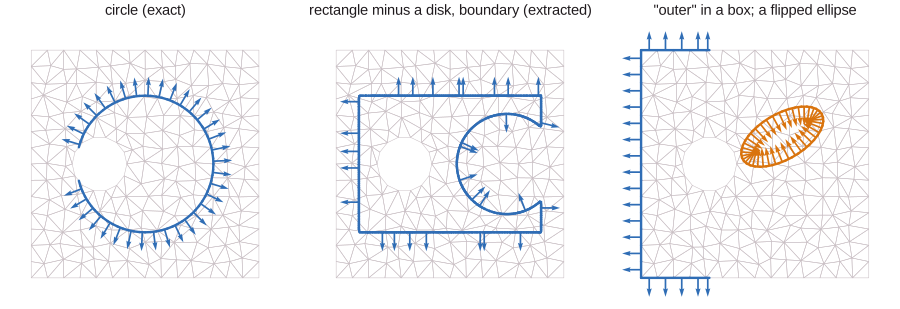
Surfaces (2D: curves) face one way, which sets the sign of what is measured through them:
| Region | Faces |
|---|---|
a closed surface: the boundary of a filled region, circle and ellipse in 2D |
out of the region it encloses |
a boundary zone, domain's boundary |
out of the domain |
a flat surface (3D disk, annulus, rectangle, polygon) |
along normal (polygon: by the right-hand rule along its vertices) |
the part of a boundary that a difference subtracts |
into the subtracted region (out of the result) |
| a 2D curve | to the right of the direction of travel |
a 3D curve (circle, ellipse, the edge of a surface) |
runs counterclockwise about its normal, or about the normal of the surface it bounds (right-hand rule) |
flip = true on any surface or curve reverses it. Points have no orientation.
As mallard check --view writes them: a circle and the boundary of a
rectangle minus a disk (the disk's part facing into the disk), and the part of
a boundary zone in a box with a flipped ellipse, on a mesh with a hole:
Surfaces and curves on a mesh
# The area of a sphere's surface and the mean pressure on it
[[probes]]
name = "shell"
variables = ["P"]
region = {type = "sphere", center = [0, 0, 0], radius = 0.1, filled = false}
reductions = ["integral", "mean"]
A surface, curve or set of points is a set of elements in the cells it
crosses: polygons, segments or points, each with its measure (area, length,
or 1 for a point) and orientation. They are made in one of two ways, and
mallard check reports which:
- Exact: the surfaces of primitives (
sphere,ellipsoid,cylinder,cone,box,torus; in 2D their circles, ellipses and polygons) and the flat surfaces and curves of 3D runs follow their own parameters, cut into patches about half a cell wide and integrated with Gauss points, so an unclipped surface has its exact area to round-off; planes (half_space) are cut from the cells exactly; boundary zones and the faces around regions of the mesh are the mesh's faces. - Extracted: the boundaries of booleans and of
implicitregions are cut from the cells as the zero set of the signed distance, linear on each cell's triangles (tetrahedra) subdividedresolutiontimes where the surface may cross them (default 3 in 2D, 2 in 3D): second-order accurate in the subdivided size.
Exact surfaces follow these parameters (u, v), with x_u x x_v facing
out; a probe resampling a surface region ([[probes]] with region and
n_points) takes n_points = [n_u, n_v] nodes along each patch, and a parameter that closes a turn
does not repeat its first node:
| Surface | u |
v |
|---|---|---|
sphere, ellipsoid |
polar angle, from the local +z pole | angle around local z, from +x |
cylinder, cone (side) |
angle around the axis | along the axis, from the base |
| their ends | radius (top), angle (bottom) | angle (top), radius (bottom) |
box faces |
the face's next axis | the one after (cyclic x, y, z) |
torus |
angle around the axis | angle around the tube |
disk, annulus (3D) |
radius, from inner_radius |
angle from reference |
rectangle (3D) |
along reference |
along normal x reference |
polygon (3D) |
each triangle of its ear clipping |
Clipping regions cut exact surfaces where their own surface crosses them: along lines of the surface's parameters, the Gauss points fill the kept intervals between the clipping region's roots, found to round-off, so a clipped area or flux converges at high order (in the tests, errors fall by over 8 per halving of the cells, to round-off); patches where the clipping boundary is not a graph over one parameter, or that several clipping regions cross, are subdivided. Extracted elements and mesh faces are cut linearly between their vertices: exactly along planes and mesh-aligned boxes. Only the parts inside the domain count. In axisymmetric runs measures are those of the r-z plane, not of the revolved surface.
Checking regions
mallard check lists every region a case uses, and the mesh's own, with its
dimension, measure and cells; surfaces and curves say whether they are exact
or extracted. A region that covers no cell is an error naming it with its
extent and the domain's:
  Regions            domain: area 1, 800 cells (of the mesh)
                     left: curve, length 1, 20 cells (of the mesh)
                     ring: area 0.0339292, 58 cells
                     probes[name = "around"].region: curve, length 0.942478, 30 cells, exact
mallard check input.toml --view view also writes view/case.vtkhdf, the
case view: one block per region (filled regions as their cells with
fraction; surfaces, curves and points with normal or, for 3D curves,
tangent, and their area, length or count) and per boundary zone. Open
it in ParaView (5.12 or later) and pick blocks in the Multiblock Inspector;
builds without HDF5 write view/case.vtm. More of the case (conditions,
probes, injectors) is to join it
(#546).
Transforms
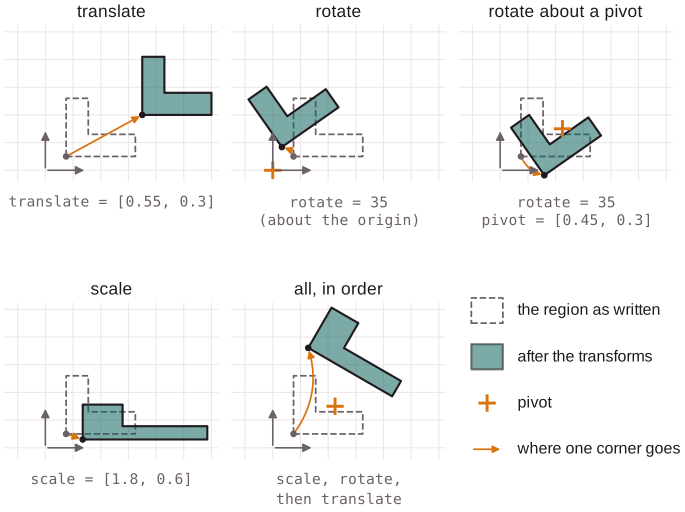
Any region, primitive or boolean, may be scaled, rotated and translated, in
that order. scale and rotate act about pivot (default the origin).
| Key | 2D | 3D |
|---|---|---|
scale |
a factor, or [s_x, s_y] |
a factor, or [s_x, s_y, s_z] |
rotate |
degrees, counterclockwise | {axis = [...], angle = degrees} (right-handed), or {axes = [[...], [...], [...]]}: the region's x, y, z axes in world coordinates |
pivot |
center of scale and rotate |
same |
translate |
a displacement | same |
Pitfall: without pivot, rotate turns the region about the origin, which
also moves it. To turn a region in place, give its center as pivot.
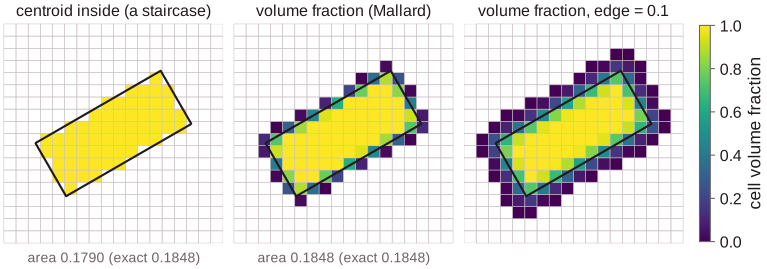
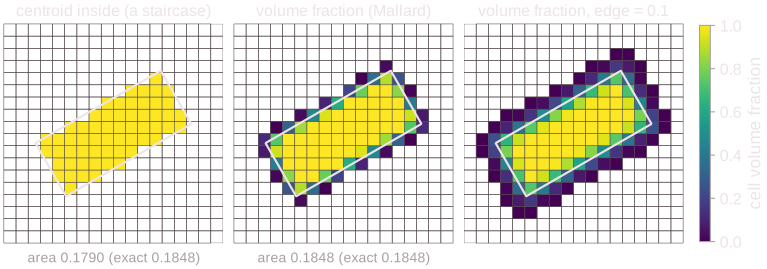
Boxes not aligned with the grid. Rotate a rectangle (3D: a box) about its center: Mallard computes the fraction of each cell that it covers, so it needs no grid lines along its sides. A test of cell centroids would make a staircase and miss part of the area:
region = {type = "rectangle", center = [0.5, 0.5], size = [0.66, 0.28], rotate = 30, pivot = [0.5, 0.5]}
In 3D, rotate about an axis, or give the region's own axes:
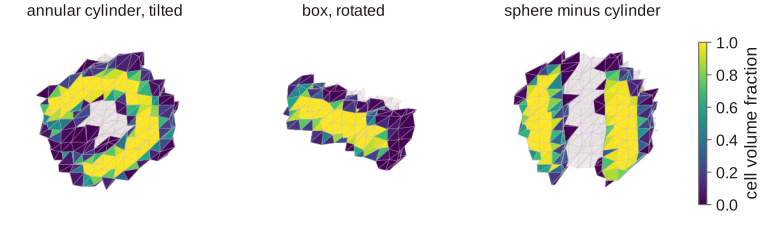
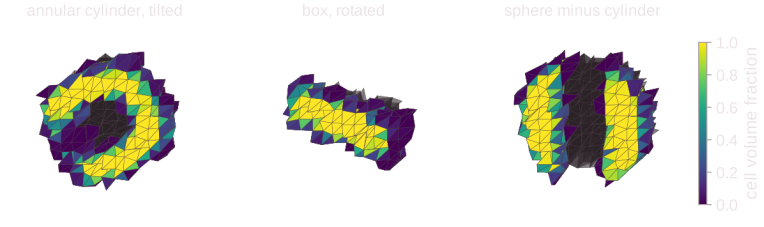
region = {type = "box", center = [1, 0, 0], size = [0.4, 0.2, 0.2], rotate = {axis = [0, 0, 1], angle = 30}, pivot = [1, 0, 0]}
region = {type = "box", center = [0, 0, 0], size = [1, 0.5, 0.2], rotate = {axes = [[0.6, 0.8, 0], [-0.8, 0.6, 0], [0, 0, 1]]}}
Annular cylinders have an inner_radius; tilt them with axis:
region = {type = "cylinder", center = [0.5, 0.5, 0.5], axis = [1, 1, 0.6], radius = 0.33, inner_radius = 0.18, length = 0.5}
Smooth edges
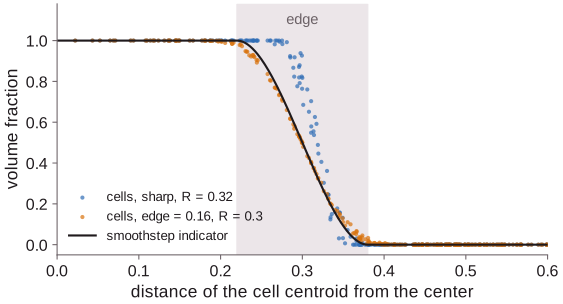
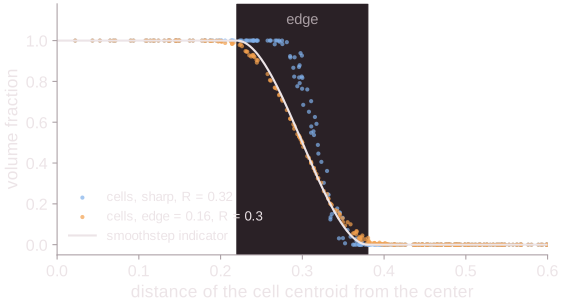
edge (on the outermost region only, a filled region of primitives) replaces the sharp surface by a band of
that width, across which the indicator falls from 1 to 0 as a smoothstep.
A source that switches on gradually excites fewer grid-scale waves. The band
keeps the volume of a flat surface and changes that of a curved one slightly
(pi R edge^2 / 5 for a sphere).
Implicit regions
# A five-lobed blob
region = {type = "implicit", f = "hypot(x - 0.5, y - 0.5) - 0.28 - 0.08 * cos(5 * atan2(y - 0.5, x - 0.5))"}
Any region f(x, y, z) < 0, in the expression syntax.
Implicit regions combine and transform like the others (f reads the region's
local coordinates).
Pitfalls:
edgeis in units off. It is a width in meters only whenfis a distance, such as"sqrt(x^2 + y^2) - 1".fgives no bound on the distance to its surface, so Mallard subdivides a cell unlessfkeeps its sign across it. A thin feature that falls between the sample points of a coarse cell can be missed: refine the mesh, or writefas a distance.
Regions on a mesh
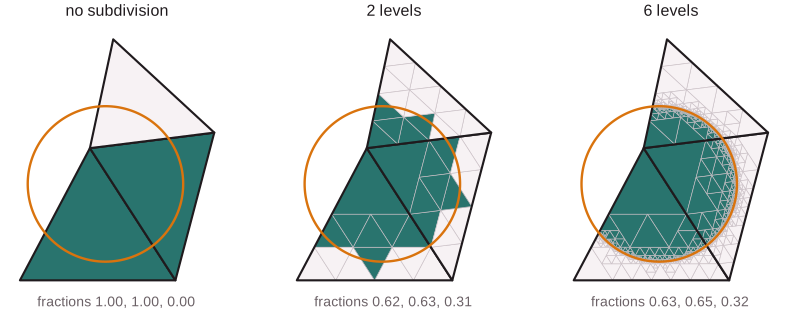
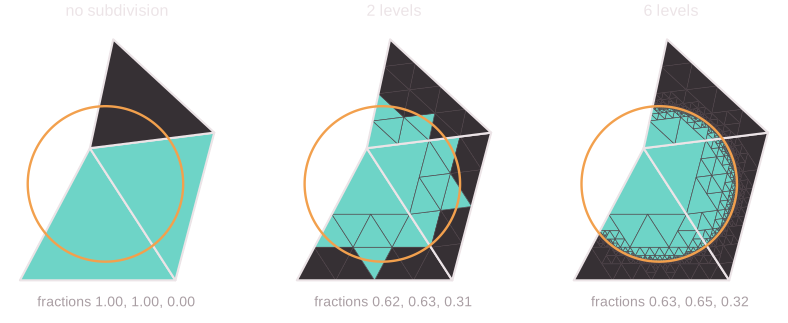
Each cell gets its volume fraction: the average of the region's indicator
over the cell. Mallard splits each cell into triangles (2D) or tetrahedra (3D)
and subdivides them where the surface may cross them (where |φ| is less than
their size), up to 8 levels in 2D and 5 in 3D. Cells entirely inside get
exactly 1, cells outside 0. A region much smaller than a cell can fall
between the samples of the deepest level; a region that then covers no part of
any cell is an error.
The same region on a stretched O-grid around a cylinder (a shell around the
wall and a wake box tilted 12 degrees) shows which cells it selects and by how
much. Write SOURCE_RHOE from a source of rhoE = 1 to see this field for
your own region and mesh:
region = {type = "union", regions = [
    {type = "annulus", center = [0, 0], radius = 0.85, inner_radius = 0.5},
    {type = "rectangle", center = [2.4, 0], size = [3.4, 0.9], rotate = 12, pivot = [0.7, 0]}]}
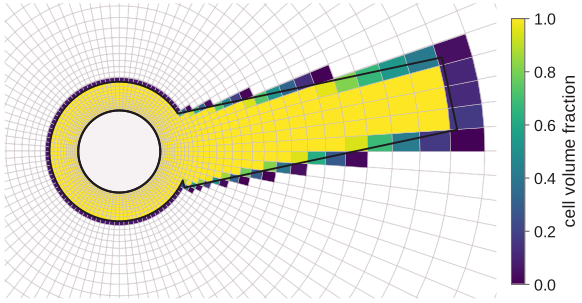
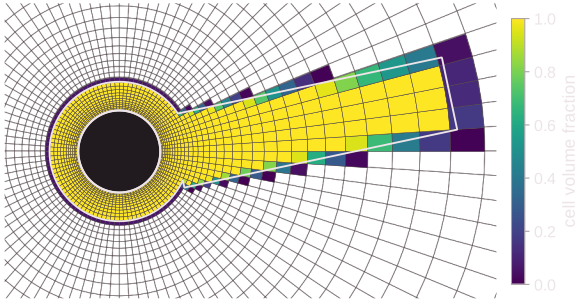
In axisymmetric runs the fractions are weighted by the radius, so they are true volume fractions of the revolved cells.
Points and curves
[[probes]]
name = "wake"
variables = ["U", "P"]
type = "arc"
center = [0.0, 0.0]
radius = 5.0
angles = [-45.0, 45.0]
n_points = 91
Probes sample at points (point, points, points_file) or along a curve
(line, polyline, circle, arc, curve). Keys:
[[probes]].
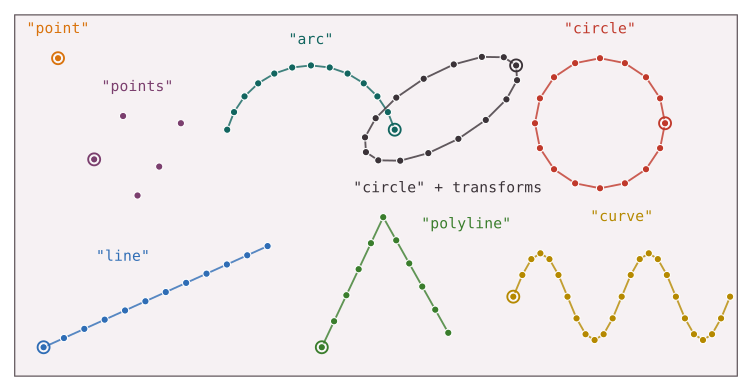
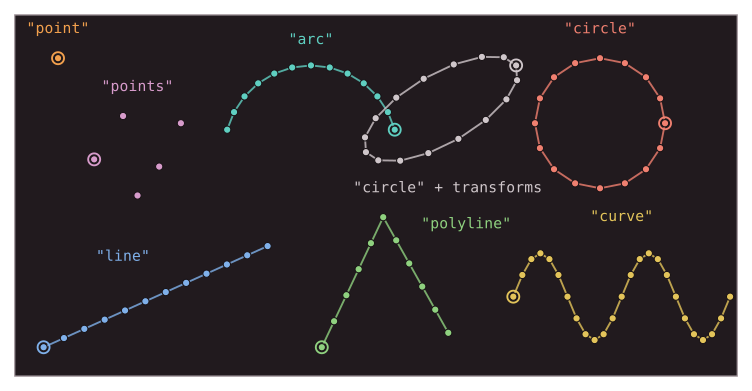
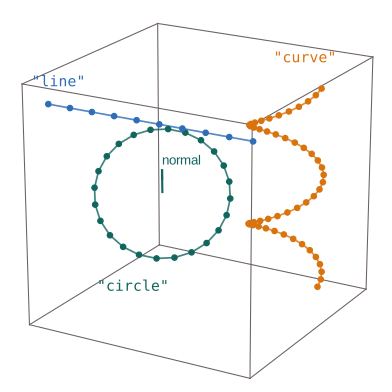
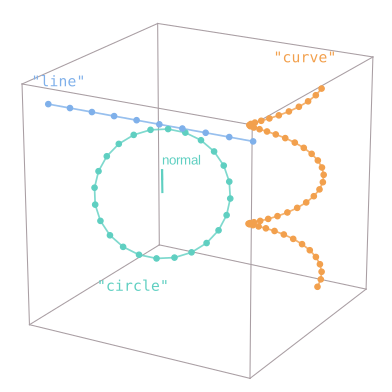
Where the samples go
type |
Samples |
|---|---|
point, points, points_file |
the points as given, in order |
line |
n_points evenly from start to end, both included |
polyline |
n_points evenly on each segment, ends included; shared vertices once |
circle |
n_points evenly, the first along reference (3D) or +x (2D), not repeated at the end |
arc |
n_points evenly from the first angle to the second, both included |
curve |
n_points evenly in the parameter s over s_range: denser where the curve moves slowly in s |
Transforms of probes are scale, then rotate, then translate, all about
the origin (probes have no pivot): the scaled and rotated circle above is
centered at the origin, then translated. A sample outside the domain takes the
nearest cell's average.
Curve reductions (mean, integral, ...) integrate along the curve with three
Gauss points between consecutive samples; points weigh each sample 1.
Cell averages or point values
sampling = "cell" (the default) returns the average of the cell holding each
sample: first-order accurate at a point off the cell's centroid.
sampling = "point" evaluates the reconstruction at the sample, which with
TENO converges at the scheme's order:
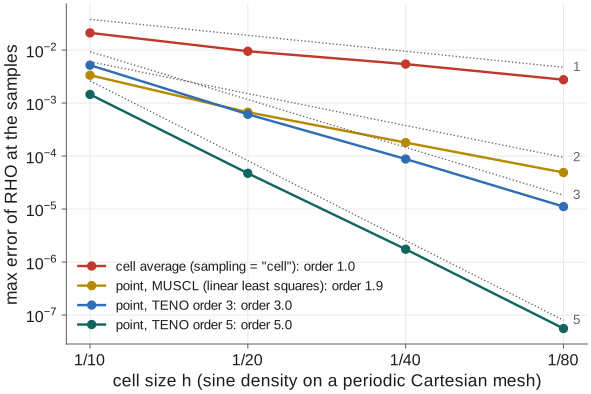
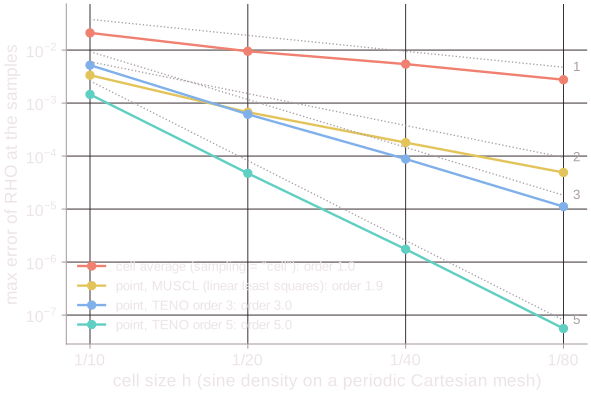
Use point to compare with references or to measure orders of accuracy, and
cell for robust values across shocks. Details and pitfalls:
Probes and monitors.
Boundary zones
Coming soon (#466): probes that sample the faces of a boundary zone.
Surfaces
Coming soon (#395): cut planes and resampled surfaces.
Reading probe output
format = "csv" (default) writes one row per sample and output, after the
header and a # provenance line:
import numpy as np

d = np.genfromtxt("probe_wake.csv", delimiter=",", names=True)  # skips the provenance line
last = d[d["step"] == d["step"].max()]
print(last["x"], last["y"], last["P"])
format = "hdf5" writes one file, its arrays growing by a row per output:
import h5py

with h5py.File("probe_wake.h5") as f:
    xyz = f["coordinates"][...]   # (samples, dimension)
    s = f["arc_length"][...]      # curves only: distance along the curve
    t = f["time"][...]            # (outputs,)
    p = f["fields/P"][...]        # (outputs, samples); U expands to fields/U_X, U_Y (, U_Z)
format = "vtkhdf" writes one VTKHDF PolyData file holding every output, and
format = "vtp" one PolyData file per output and a .pvd series: open the
.vtkhdf (or .pvd) in ParaView, then plot along the curve with Plot Data (by
arc_length) or over time with Plot Data Over Time. Reductions go to
probe_<name>_reductions.csv. Format details: [[probes]].