Running on a cluster
A cluster run is the same mallard -i input.toml as on a laptop, with four
more questions: how many ranks and GPUs to ask for, how to launch them, how to
watch and steer the run while it goes, and how to carry on when the job ends
before the run does (a time limit, a preemption, a node lost). This tutorial
answers them on a double Mach reflection that runs in a few minutes on a laptop
CPU, through the same job script that the cluster templates are built on. Every
command and output below is from such a run, on 2 MPI ranks of 2 threads each.
You will use: mallard check to size a run, the job scripts of
tools/jobs/, the rank report and automatic GPU and core
binding, mallard ctl (status, checkpoint, stop), stopping a run as a
scheduler does and resuming it from its newest restart file, the progress rows
of the log, the run health and the run record mallard.jsonl. Files:
tutorials/cluster/. Setup: Tutorials,
with an MPI build, and the mallard of that build on the PATH:
1. The case
A Mach 10 shock meets a wall at 60° and reflects off it in a double Mach
stem (Woodward & Colella, 1984). input.toml
is the double_mach example with half the cells in
each direction, 480 × 120 squares split into 115,200 triangles, with fifth-order TENO-E,
up to t = 0.2. One table matters for a cluster run, a restart writer:
It writes restart_<step>.restart every 0.02 time units: a job that ends
without warning (a node failure, kill -9) loses at most that much. Restarts
asked for with a signal or mallard ctl go to the same writer, so every
restart file of the run matches restart_*.restart, the pattern the job
scripts resume from. Choose the interval so that a restart is written every
half hour or so of wall time: restart files hold the whole solution (here
3.7 MB each, gigabytes on large meshes) and are written in the background.
mkdir -p run/cluster && cd run/cluster
cp $MALLARD/tutorials/cluster/input.toml $MALLARD/tools/jobs/mpirun.sh .
2. Size the run
How many ranks, how much memory and how much time: mallard check sets the
case up without running it and answers all three. --steps N times N steps
after an untimed one; under mpirun -n N it checks the run on N ranks:
== Check ==================================================================================
  Input keys         all used
  Boundaries         every boundary face has a condition (5 conditions)
  ...
  Time step          0.0002196 (from run.cfl), CFL 1 at the initial state
  CFL-limiting       cell 16,247 at (0.5611, 0.6972)
                     13,136 cells within 10% of it, in (0.002778, 0.002778) to (0.7389, 0.9972)
  Memory             498MB per rank after setup (peak 506MB), 59,520 cells, 2 ranks
  Throughput         531k cells/s per rank (measured over 20 steps)
  Cost               4555 steps per unit simulated time
                     per unit time: 8m 14s wall on 2 ranks, 0.275 rank-hours
                     per flow-through (1.06): 8m 44s wall on 2 ranks, 0.291 rank-hours
                     to t_stop = 0.2: 1m 39s wall on 2 ranks, 0.0549 rank-hours
  Result             ok
The cost comes from the time step of the initial state. Here the flow speeds up behind the reflected shock, and the run below takes 1,167 steps rather than 911 and 2m 46s of time stepping, about 1.7 times the estimate: ask the scheduler for a generous margin, and let the restarts catch the rest.
You need not have the cluster at hand to size a run on it. --ranks N
scales a serial check to N ranks (memory of the largest part the partitioner
would make), and --throughput R takes the cells per second per rank from
elsewhere: from the summary of an earlier run (its Throughput divided by its
ranks) or from Performance. An A100 runs 2D TENO-E
at about 5 × 10⁷ cells/s (Multi-GPU scaling),
so the full-size example on 4 GPUs:
  Memory             3.96GB per rank after setup (peak 3.96GB), 460,800 cells, 1 rank
                     on 4 ranks: about 1.06GB per rank (peak 1.06GB), largest part 115,200 + 7,680 halo cells
  Throughput         50.0M cells/s per rank
  Cost               9109 steps per unit simulated time
                     per unit time: 21.0 s wall on 4 ranks, 0.0233 rank-hours
                     per flow-through (1.135): 23.8 s wall on 4 ranks, 0.0265 rank-hours
                     to t_stop = 0.2: 4.20 s wall on 4 ranks, 0.00466 rank-hours
(From a CPU build; a GPU build counts GPU-hours and device memory.) Seconds on 4 GPUs: this case does not need a cluster, and at 115,000 cells per GPU would not use 4 GPUs well. Rules of thumb for choosing the ranks:
- GPUs: one rank per GPU, and enough cells per GPU to keep it busy: at 1M cells per GPU, 2D TENO-E scales at 93% from 1 to 16 GPUs, while a 1M-cell mesh on 16 GPUs (62,500 cells each) runs at 39% efficiency (Multi-GPU scaling). Below a few hundred thousand cells per GPU, use fewer GPUs.
- Memory: the
Memoryline per rank must fit the GPU (or the node's memory over its ranks), with a few hundred MB per GPU for CUDA itself. - CPUs: ranks × threads at most the cores of the node, typically one rank
per socket or NUMA node, or per 8 cores, with
OMP_NUM_THREADSthreads each. - Time: the job's time limit from the
to t_stopline with a margin; a run longer than the queue allows runs as a chain of jobs (section 5).
3. Launch with a job script
tools/jobs/ has one script per launcher (they are also
installed in share/mallard/tools/jobs/):
| Script | Where | Launches with | Submit |
|---|---|---|---|
mpirun.sh |
The machine you are on | mpirun |
./mpirun.sh |
slurm_single_node.sh |
One node under Slurm | srun |
sbatch slurm_single_node.sh |
slurm_multi_node.sh |
Several nodes under Slurm | srun |
sbatch slurm_multi_node.sh |
pbs.sh |
PBS Pro or Torque | mpirun |
qsub pbs.sh |
kubernetes_job.yaml |
One Kubernetes pod with several GPUs | mpirun in the release container |
kubectl apply -f kubernetes_job.yaml |
They all do the same four things: start one rank per GPU (on CPUs, one per
group of cores), bind each rank to cores of its own, resume from the newest
restart_*.restart if there is one, and turn the scheduler's warnings into a
clean stop with a restart file. mpirun.sh runs on a laptop, so it is the one
to try first; without GPUs it starts one rank per 8 cores, and NRANKS and
THREADS override that:
The log starts with the header and, for parallel runs, where each rank runs:
  Mallard            v0.8.0-90-g44aa87db
  Build              2D, double precision, Release, AppleClang 21.0.0.21000334
  Kokkos             5.2.2, Threads (2 threads)
  Device             Apple M4 Pro
  MPI                2 ranks, GPU-aware no
  ...
== Ranks ==================================================================================
  rank  host          CPUs  NUMA  threads
  0     laptop        -     -     2
  1     laptop        -     -     2
On a GPU node the same table names each rank's GPU, its PCI bus and NUMA
node, and the cores the rank is bound to. Mallard gives every rank its own GPU
by itself, the one nearest the rank's cores: there is nothing to set but one
rank per GPU and the core binding the scripts already do. If the placement
wastes hardware (two ranks on one GPU, a rank's cores on the other socket from
its GPU, more threads than cores), warnings follow the table, each with its
usual cause and fix in GPUs and cores.
macOS cannot bind processes to cores, hence the - here.
mallard check before a long job, and the rank report in its first minute,
catch most of what goes wrong on a cluster before it costs a queue wait.
4. Watch and steer the run
Every [output] check_interval steps (50 here) the log prints a progress row,
and between them a row for each file written or request acted on:
== Run ====================================================================================
    step          t       dt   done  wall/step cells/s     ETA    min rho     min p max Ma troubled
       0 0.0000e+00 2.20e-04   0.0%         --      --      --   1.40e+00  1.00e+00  1.827    0.00%
       0 0.0000e+00  vtu      solut/dmr_000000.pvtu
       0 0.0000e+00  restart  restart_000000.restart
      50 1.0258e-02 1.91e-04   5.1%     131 ms    882k  2m 01s   1.40e+00  9.99e-01  2.148    1.44%
     100 1.9370e-02 1.81e-04   9.7%     124 ms    927k  1m 59s   1.40e+00  9.93e-01  2.463    1.57%
     104 2.0000e-02  restart  restart_000104.restart
What to look for in a long job:
doneandETA: progress by whichever stop condition comes first, and the wall time left at the current rate. An ETA beyond the job's time limit means a chain of jobs (section 5).wall/stepandcells/s: the throughput. Divided by the ranks, it is whatmallard check --throughputtakes for the next run. A drop partway through points at the machine (a slow node, a shared file system writing output) more often than at the solver.min rho,min p,max Ma: a minimum density or pressure heading for zero warns of a crash before it happens. A non-finite value stops the run with the last valid state written (Divergence).troubled: with TENO, the share of cells at shocks; it grows here as the reflected shocks lengthen.
The same rows go, as JSON, to mallard.jsonl (the run record),
for scripts and dashboards. While the run goes, mallard ctl asks it directly,
through the socket mallard.sock in the case directory:
state: running
step: 104
t: 0.02
dt: 8.44132e-05
cfl: 0.4651
progress: 10.00%
stop_at: t_stop = 0.2
wall: 24.3 s
wall_per_step: 118 ms
cells_per_second: 976k
eta: 1m 59s
cells: 115200
ranks: 2
memory_host: 712.89 MiB (peak 947.41 MiB, rank 0)
monitors_step: 100
min_rho: 1.39867
min_p: 0.992887
max_mach: 2.46259
troubled_cells: 0.0157465
(The step to t = 0.02 is shortened to land on the restart's time, hence cfl
0.47.) checkpoint writes a restart after the current step and carries on,
for instance before trying something risky with mallard ctl . set:
and the log shows it:
mallard ctl must run on the node of rank 0, in the directory the run was
started from (or with its path): on a cluster, log in to the job's first node
(ssh, or srun --jobid=<job> --overlap under Slurm), and in Kubernetes,
kubectl exec job/mallard -- mallard ctl /work/case status.
mallard ctl . set changes the stop time, wall-time limit and output
intervals of the running job; Running and controlling jobs
lists what it accepts.
Run health
The progress rows say how fast the run goes; the run health says whether it
is still right. At each progress row Mallard also records, in the row's
health in mallard.jsonl, the smallest density, pressure and temperature
with the cell and step where they occurred, the troubled cells per rank, the
output time per step, and a conservation ledger: the change of the total
mass, momentum and energy against what crossed the boundaries. The log ends
with a summary of it, here at the end of the third job of section 5:
== Health =================================================================================
  Lowest             rho 1.39 (step 461), p 0.982 (step 800), T 0.703 (step 1000)
  Activity           troubled_cells 5.36% (ranks 3.97-6.74%) at the last report
  Conservation       unexplained change mass -1.1e-14, momentum_x 9.9e-15, momentum_y 6.7e-15, energy 1.4e-13
  Output             output_sync 569 us, output_async 177 us per step (slowest rank)
Lowest: the smallest value over the job and when; each row'smarginsalso gives the cell centroidx, where to look in the next snapshot. Mallard warns once in the log when the density or pressure falls below 10-3 of its domain mean, before it reaches zero.Activity: the share of troubled cells over the domain, then on the least and the most active rank. With MUSCL it islimited_cells.Conservation: the change of each total that the boundaries, sources and repairs do not explain, relative to the total. Round-off, as here, is a healthy run; Mallard warns above 105 machine epsilons, and anything near that is a bug to report, not a setting to tune.Output: the time per step spent writing files, by the time loop (output_sync) and by the background writers (output_async), on the slowest rank. Next towall/stepit should stay small; when it grows on a cluster, the shared file system is the bottleneck.
Mixtures add Repairs (the composition clips of the chemistry) and
Elements; Run health has every field.
mallard.jsonl is flushed at each row, so a script can follow the health
while the job runs, from any node that sees the case directory:
import json
for line in open("mallard.jsonl"):
    r = json.loads(line)
    if r["type"] == "progress" and "health" in r:
        h = r["health"]
        print(r["step"], h["margins"]["p"]["value"], h["activity"]["troubled_cells"]["rank_max"],
              max(abs(b["relative"]) for b in h["balance_run"].values() if b["checked"]))
461 0.9873881089968589 0 0
500 0.989614939736035 0.05876736111111111 2.115455742435417e-13
...
1167 0.9874959351011933 0.06744791666666666 1.3776078206902286e-13
5. Stop, and resume from the newest restart
A scheduler ends a job with a signal: Slurm with SIGUSR2 five minutes before
the time limit (#SBATCH --signal=B:USR2@300 in the scripts), with SIGTERM
when it preempts or cancels the job, Kubernetes with SIGTERM when it evicts
the pod. The scripts turn each into a stop request: Mallard finishes the
current step, writes a restart and the final output, and exits with status 3.
Do here what the scheduler would, SIGTERM to the job script (Ctrl-C in a
terminal does the same):
     333 6.0000e-02  restart  restart_000333.restart
Stopping after the current step (Ctrl-C again to stop now)
     339 6.1022e-02  stop     stop requested by mallard ctl
     339 6.1022e-02 1.70e-04  30.5%     128 ms    900k  1m 38s   1.39e+00  9.88e-01  3.312    2.38%
     339 6.1022e-02  vtu      solut/dmr_000002.pvtu
     339 6.1022e-02  restart  restart_000339.restart

== Summary ================================================================================
  Stopped            stop requested by mallard ctl at step 339, t = 0.0610224
  Wall time          54.1 s: setup 11.0 s, time stepping 43.0 s, diagnostics 1.34 ms, output 16.9 ms
  Throughput         907k cells/s, 127 ms per step over 339 steps
  Writing            43.5MB of files in 8.21 ms (in the background)
  Files              3 vtu (solut/dmr.pvd), 6 restart
The stop says mallard ctl because that is how mpirun.sh asks: mpirun
would end the ranks at once on SIGTERM, so the script asks through the
socket instead (or with SIGUSR2, which mpirun forwards, before the time
loop has opened it). Open MPI then reports that a rank exited with status 3;
that is the stop, not an error. A scheduler's grace period between its
SIGTERM and the kill must cover a step plus a restart write.
Resuming is running the same script again. It finds the newest restart file
and adds --restart restart_000339.restart to the command line, which
replaces the input's [initialize] table:
  Initial state      restart from restart_000339.restart (step 339, t = 0.0610224)
  ...
    step          t       dt   done  wall/step cells/s     ETA    min rho     min p max Ma troubled
     339 6.1022e-02 1.70e-04  30.5%         --      --      --   1.39e+00  9.88e-01  3.312    0.00%
     350 6.2896e-02 1.70e-04  31.4%     160 ms    722k  2m 09s   1.40e+00  9.89e-01  3.337    2.42%
This time stop it with mallard ctl, which replies once the run has ended:
and run the script a third time, in the foreground, to the end:
  Stopped            t_stop = 0.2 reached at step 1,167, t = 0.2
  Wall time          1m 57s: setup 12.5 s, time stepping 1m 45s, diagnostics 22.1 ms, output 24.7 ms
  Throughput         778k cells/s, 148 ms per step over 706 steps
The exit status tells a job chain what to do next: 0, finished; 1, an error
or divergence (look before resubmitting); 3, stopped on request (resume).
Under Slurm and PBS the scripts resubmit themselves after a stop at the time
limit, up to MAX_JOBS times, so a run of days goes as a chain of
24-hour jobs with no one watching. After a preemption or scancel they do not:
resubmit the same script (or let the site's requeue do it), and it resumes
the same way. The Kubernetes Job starts a new pod after an eviction, which
resumes; an error, or a stop you asked for, ends the Job.
The three jobs leave one history: mallard.jsonl gets a start record at
each resume and an end record with the reason at each stop.
plot_run.py reads it and the last snapshot:
job 1: steps 0 to 339, t = 0 to 0.06102: stop requested by mallard ctl
job 2: steps 339 to 461, t = 0.06102 to 0.0817: stop requested by mallard ctl
job 3: steps 461 to 1167, t = 0.0817 to 0.2: t_stop = 0.2 reached
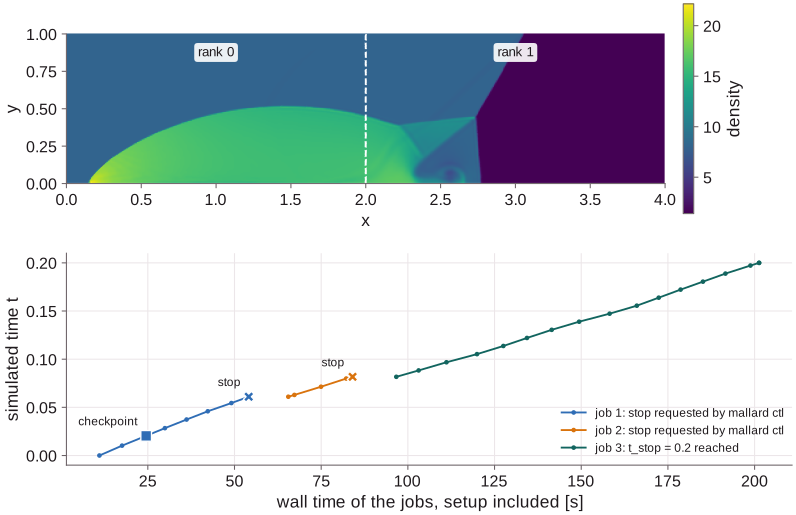
The gaps between the jobs are their setups, about 11 s each here (mostly the
TENO stencils and the deeper halo they need): a chain of jobs pays the setup once per job, so make each job
long against it. The result does not depend on the stops: the solution in
restart_001167.restart is bit for bit that of an uninterrupted run on 2 ranks
(the files differ only in their provenance trailer, which records when and
where each was written). A run can also resume on a different number of ranks
(Restarts), for instance on whatever GPUs the
queue has free.
Restart files pile up, one per interval and per stop: keep the newest two (the newest may be cut short if the job is killed while writing it) and delete the others as the run goes.
A --restart latest option, which finds the newest complete restart file
itself so the scripts need not, is planned
(#510).
6. On a real cluster
Copy the script for the scheduler into the case directory and fill in the
lines marked <...>: nodes, GPUs and cores per node, the time limit, the
modules Mallard was built with, and MALLARD if mallard is not on the
PATH. For the full-size case on one node of 4 GPUs under Slurm:
cp $MALLARD/examples/double_mach/input.toml .
cp $MALLARD/tools/jobs/slurm_single_node.sh .
# set --ntasks-per-node=4, --gpus-per-node=4, --cpus-per-task=<cores / 4>, --time
sbatch slurm_single_node.sh
and add a [[write_data]] restart writer to the input as in section 1. Then:
- Several nodes:
slurm_multi_node.sh, from a directory every node sees. Build with-DMallard_GPU_AWARE_MPI=ONor-DMallard_ENABLE_NCCL=ONso halos go between GPUs directly; the script has the environment variables some MPIs need for it. - PBS:
pbs.shdoes the same, with a timer for the walltime since PBS warns too late to write a restart. - Kubernetes:
kubernetes_job.yamlruns one pod with several GPUs on a persistent volume. The manifests indocs/guide/k8s/add aJobthat copies the examples to the volume and anMPIJob(Kubeflow MPI Operator) over several nodes; Kubernetes describes them.
In each, check the rank report in the first minute (one rank per GPU, no
warnings), then follow the progress rows or mallard ctl status as above, and
read the run health at the end of each job.
Running on clusters has the
scripts' details: signals, grace periods and binding with other MPIs.
7. Things to try
- Resume on another rank count. Stop the run, then resume with
NRANKS=1orNRANKS=3: the log reports the new partition and the run carries on from the same state. - A file-based stop. With
[run] control_file_interval = 10,touch STOPin the case directory stops the run asmallard ctl . stopdoes, from any node that sees the directory. - Change the run as it goes.
mallard ctl . set t_stop=0.25extends the run;set write_data.solut/dmr.time_interval=0.01writes snapshots twice as often.