Oblique shock on a ramp
Air at Mach 1.76 meets an 8° ramp. The flow turns at the corner through a straight oblique shock, which the θ-β-M relation of gas dynamics predicts exactly: its angle and the pressure jump across it. This tutorial runs the case on a mesh that Mallard generates itself, so no mesh file is needed. It looks at the output in ParaView and with Mallard's Python tools, and checks the shock against theory on three meshes. Each run takes seconds to a minute on a laptop CPU.
You will use: a generated mesh and its boundary zones, a supersonic inflow, an outflow and slip walls,
SI units with the gas constant set by the reference state, snapshots, a line probe, ParaView and
plot_vtu.py. Files: tutorials/wedge/. Setup: Tutorials.
1. The problem and its exact solution
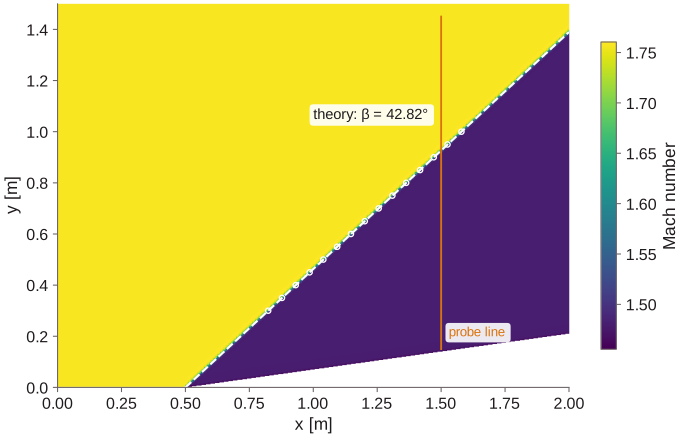
A uniform supersonic stream along a wall that turns by θ = 8° at x = 0.5 m. Upstream of the shock the flow is undisturbed. Downstream it is again uniform and parallel to the ramp, at a higher pressure and a lower Mach number. For a given Mach number M and deflection θ, the shock angle β solves
tan θ = 2 cot β (M² sin²β − 1) / (M² (γ + cos 2β) + 2),
whose smaller root (the weak shock) is what forms on a ramp. oblique_shock.py solves it for the
inflow of the input file:
mkdir -p run/wedge && cd run/wedge
cp $MALLARD/tutorials/wedge/input.toml .
python3 $MALLARD/tutorials/wedge/oblique_shock.py input.toml
M = 1.7577, ramp 8 deg: shock angle 42.82 deg, p2/p1 1.4984, rho2/rho1 1.3323, T2/T1 1.1246, M2 1.4809 (largest deflection 18.29 deg)
The inflow is 600 m/s at 300 K. Its Mach number is 1.758, not the 1.73 of air with R = 287 J/(kg K): Mallard takes the gas constant from the reference state, R = p_ref / (ρ_ref T_ref) = 277.4 J/(kg K) here (see Physics). Above 18.3°, no attached shock exists at this Mach number.
2. Mesh
[mesh] type = "wedge" generates this geometry directly: an Nx × Ny grid of quadrilaterals on
[0, Lx] × [0, Ly], whose bottom rises at 8° from x = 0.5, with the cells squeezed above the ramp. Like
every generated 2D mesh, it has four boundary zones: left, right, bottom and top. The
[[boundaries]] of the input refer to them by name.
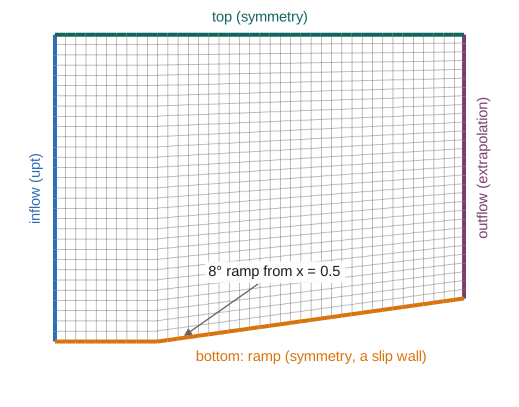
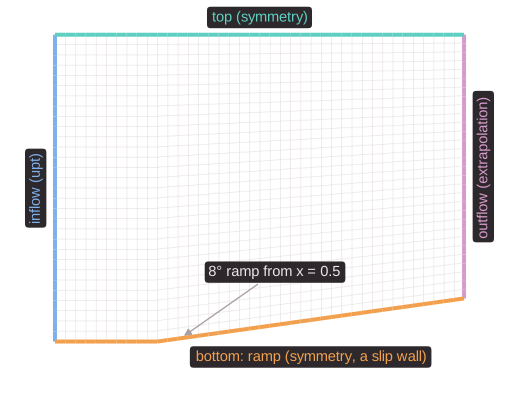
python3 $MALLARD/tutorials/wedge/plot_mesh.py input.toml --out . draws it. The other generated meshes
(cartesian, cartesian_tri, and boxes of hexahedra, tetrahedra, prisms or pyramids in 3D) and their
stretching are in Meshes.
3. Input file
input.toml is in SI units:
| Table | In this case |
|---|---|
[run] |
t_stop = 0.02 s (six passes of the flow through the 2 m domain), at CFL 1 |
[mesh] |
type = "wedge", 160 × 120 cells on 2 m × 1.5 m |
[initialize] |
The inflow state everywhere (type = "constant"): u = (600, 0) m/s, p = 101,325 Pa, T = 300 K |
[[boundaries]] |
left: upt, the inflow imposed (supersonic: every characteristic enters); right: extrapolation (supersonic outflow: every characteristic leaves); bottom (the ramp) and top: symmetry, a slip wall |
[numerics] |
HLLC, SSPRK3, MUSCL with the Venkatakrishnan limiter |
[physics] |
euler, γ = 1.4, and the reference state that sets R |
[[probes]] |
66 points on the vertical line x = 1.5 m, every 10 steps: probe_line.csv |
[[write_data]] |
Every 2 ms: density, velocity, pressure and temperature, solut/wedge_*.vtkhdf with the series solut/wedge.vtkhdf.series |
The slip wall is the right condition for the ramp because the Euler equations have no viscosity, so there is no boundary layer. The Boundary conditions page lists the others: inflows, outflows, far fields, walls, characteristic boundaries.
4. Run
This takes 2,240 steps and about 6 seconds on a laptop. Every 200 steps ([output] check_interval)
Mallard prints the step, time, time step, throughput and the extremes of density, pressure and Mach
number. With an MPI build, mpirun -n 2 $MALLARD/build/src/mallard -i input.toml splits the mesh between
two ranks and gives the same result bit for bit.
5. Look at the output
ParaView. Open solut/wedge.vtkhdf.series (solut/wedge.pvd in builds without HDF5; File → Open), click Apply, color by P and step through time:
the shock forms at the corner, travels up and out of the domain, and settles at its final angle. The
values are cell averages, one per cell, so choose Surface rather than interpolated colors to see them
as they are.
Python. Mallard's tools read the same files without ParaView:
python3 $MALLARD/tools/post/plot_vtu.py solut/wedge_000010.vtkhdf pressure.png --var P --contours 20
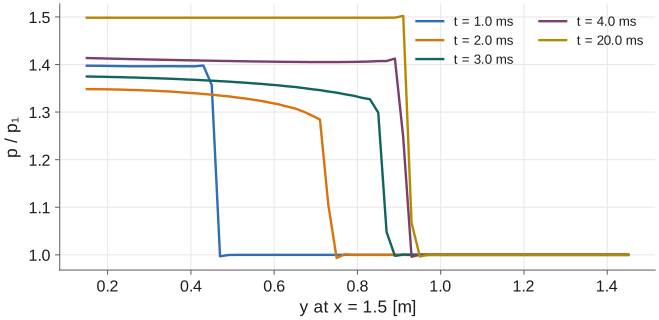
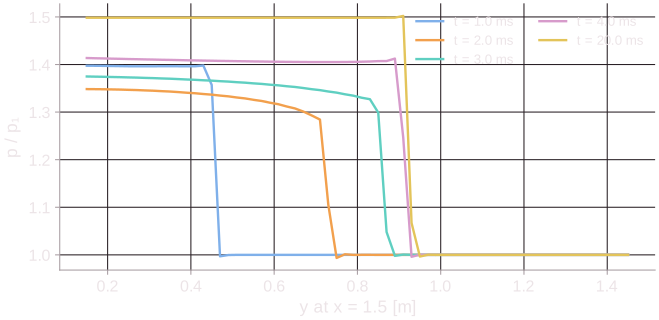
The probe. probe_line.csv holds the pressure on the line x = 1.5 m every 10 steps, one row per
point and time (step,t,point,x,y,P). It shows how the shock forms: by t = 4 ms it has reached its
place, and the pressure behind it has risen to its final level.
6. Compare with theory
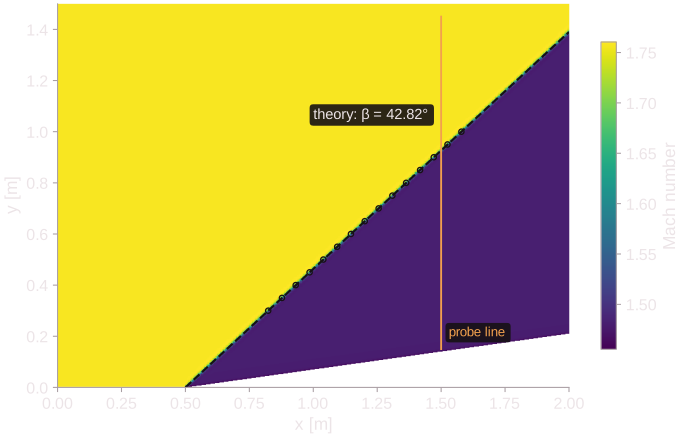
measures the shock angle in the last snapshot. Along 15 horizontal lines it finds where the pressure crosses halfway up the theoretical jump, and fits a line through the corner to those points. It also reports the mean pressure behind the shock, then draws the Mach number with the theoretical shock and the measured points:
With one run directory per mesh (Nx, Ny = 80 × 60, 160 × 120, 320 × 240),
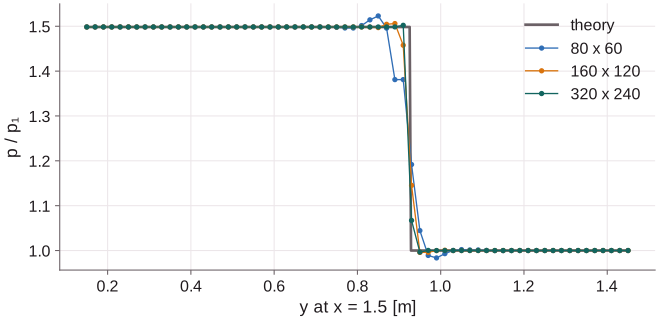
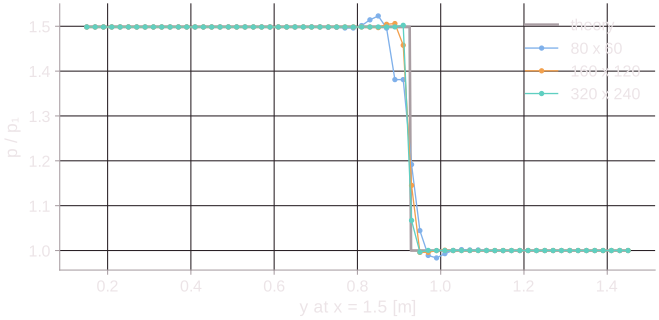
plot_results.py coarse medium fine --labels "80 x 60" "160 x 120" "320 x 240" compares them:
| Mesh | Cells | Run time (6 threads) | Shock angle | p2/p1 |
|---|---|---|---|---|
| 80 × 60 | 4,800 | 0.7 s | 42.83° (+0.02°) | 1.4987 (+0.02%) |
| 160 × 120 | 19,200 | 6 s | 42.82° (+0.00°) | 1.4984 (+0.00%) |
| 320 × 240 | 76,800 | 44 s | 42.82° (+0.01°) | 1.4984 (+0.00%) |
| Theory | 42.82° | 1.4984 |
The uniform states on either side of the shock are exact on every mesh, as they must be for a conservative scheme. Refinement only narrows the shock, which spans two to three cells.
7. Things to try
- A detached shock. Lower the inflow to 420 m/s (Mach 1.23) in
[initialize]andleft.oblique_shock.pyreports that no attached shock exists. The shock now stands ahead of the corner, it is curved, and the flow behind it is partly subsonic. - Higher order. Replace the MUSCL table with
type = "TENO",order = 5and compare the shock width on the probe line. The Numerics page explains the choice. - Another Mach number. Raise the inflow to 800 m/s:
oblique_shock.pygives the new angle, and the shock lies closer to the ramp. Check that it still leaves throughrightrather thantop, where the slip wall would reflect it.
Next: Vortex shedding behind a cylinder, with a mesh of your own from Gmsh and viscous flow.